Friday, September 10, 2010

Guide to Change Your iPad SSH Password

When you jailbreak, the filesystem’s password is set to the common password “alpine” As people usually don’t bother changing this password after performing a jailbreak, it’s really easy for hackers to get access to any jailbroken iPad on a public network. Changing the password is quick and easy — after the jump is a tutorial showing how to change the SSH password.

Note : Mobile terminal isn’t compatible at the moment, for the time being you can turn off Turn of SSH when not required. Install SBSettings from Cydia so you can turn it off or on when you really required this. Once Mobile Terminal gets updated with iPad support you can change your password with the following instructions.

Change the Root Password of iPad : it’s the most easiest way all you need is to install Mobile Terminal and perform the following commands.

type: su root
then type : alpine
then type: passwd
then enter your new password:

once done; also change the password of the mobile user name.

type: passwd mobile
then enter the new password for the mobile username;

this will ensure that your iPad is safe from hackers.


Open SSH for iPad

SSH means secure shell - you can coonect thru your iPad via SSH!
This protocol allow us to access the file system of the iPad Touch once you ran the Jailbreak. We may, thus, transfer files and content at will, in any folder. once you’ve got ssh installed on your iPad and active, you can access your iPad from a shell on your Mac or with third party programs.

Connecting to your iPad remotely lets you use the full power of your device!.
from cydia, go to the menu and install OpenSSH then download putty and after
everything is done go to the wiufi settings of your iPad and fins the I.P address assigned to the device. enter it to the puTTy client or winscp for windows and cyberduck for mac Os, you can connect from there.

Instructions :

Note of your iPad IP address from Settings > WiFi and tap on the blue arrow to the right of the name of your home network. In the next screen you can find the IP Address of your wireless network.

Now Launch your SSH client program. you will need to fill the following information, enter the ip address of the iPad, just leave the ports to default.

Hostname or Server = iPad's IP Address "ex. 192.168.0.100"
Username = root
Password = alpine

("the default password is alpine, you can change this in your iPad anytine")

File Protocol = Should be SCP on WinSCP and SFTP on Cyberduck

How to jailbreak iPad, iPod touch, iPhone

How to jail break iPad?

just got my ipad a couple of weeks ago from my godfather in new york. :)
he's not a mafia or an american gangster..but anyway, i have decided to jailbreak the ipad
for so many reasons. like maximize the use of the hardware. and make my ipad more productive, play more games ("full version games that are available for downloads") and so much more. so lets get started.

after doing some research on the apple ipad and how it w
orks. im now ready to jailbr
eak the ipad, just follow this guide carefully to jailbreak your
ipad.

first of all. you need to check your ipad version ("works with ipod touch,ipad,itouch, iphone).

Check the firmware version of the ipad,ipod touch, iphone. firmware should be 3.1.2, 3.1.3 or 3.2 (not the 3.2.1 firmware)

the apple device should be ACTIVATED, it should not be stuck on the Connect to iTunes or Emergency Call screen.

Check your iTunes version. "iTunes 9 earlier than 9.2

Syncing with iTunes b
efore trying this jailbreak and you should also backup evrything just in case the jailbreak wont go well for you. but chances are .1% if you just follow the instruction well.

now you need to download Spirit Jailbreak. download here: http://spiritjb.com/


Note: make sure you have checked the firmware of your iPad,itouch or iphone before you continue, also dont forget to check your iTunes Version.

just to make su
re here is a download link of iTune Ver.
9.1.1

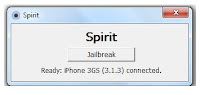
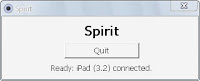
if everythig is checked. then you are good to go. connect your iPad to your USB cable and run the file spirit jailbreak. should look like this image below.

Now click the button to jailbreak your device, and wait when its finished.


your Apple iPad is now jailbroken..

Your iPad will restart. just wait for it to restart and its all done.


After it has restarted the screen should look like this. this is a jailbroken iPad screen.

Now just go to cydia and wait for it to run for the first time. your iPad will restart and then run it again and when you are prompted with a selection just choose graphical mode for simple mode. then when donw update cydia and wait for it to load again.

Thursday, September 9, 2010

The Apple Wireless Keyboard for ipad

Apple iPad Wireless Keyboard

Work like the desktop and use the Apple Wireless Keyboard on your iPad, on your lap, or anywhere within 30 feet of your iPad or Mac — The Apple Wireless Keyboard has a built-in Bluetooth technology. Its has a compact design takes up 24 percent less space on your desktop than full-size Mac/PC keyboards, so you have extra room to move the keyboard around and mouse comfortably alongside of it. You’ll also feel a difference when you type on its low-profile anodized aluminum enclosure with crisp, responsive keys. Use the function keys for one-touch access to a variety of Mac features such as screen brightness, volume, eject, play/pause, Exposé, and Dashboard.
The Apple Wireless Keyboard requires just two AA batteries — one less than the previous model. And its intelligent power management system conserves battery life. So when you’re not using the keyboard, it automatically powers down. The instant you start typing, it turns back on. Use the on/off switch when you're away from your computer for a long time.

Apple iPad Camera Connection Kit

The Apple iPad Camera Connection Kit

One of the best thing on the ipad is the iPad Camera Connection Kit, it gives you two ways to import photos and videos from a digital camera: using your camera’s USB cable or directly from an SD card. iPad and the Camera Connection Kit support standard photo formats, including JPEG and RAW. also you can use this kit to read usb flash drives and usb mobile disk in your ipad. for as low as $30.00 you can have this great gadget.

http://store.apple.com/us/product/MC531ZM/A#overview

The Apple ipad Technical Specifications

Technical Specifications

Size and weight1
Height: 9.56 inches (242.8 mm)
Width: 7.47 inches (189.7 mm)
Depth: 0.5 inch (13.4 mm)
Weight: 1.5 pounds (0.68 kg) Wi-Fi model;
1.6 pounds (0.73 kg) Wi-Fi + 3G model

iPad Display
9.7-inch (diagonal) LED-backlit glossy widescreen Multi-Touch display with IPS technology
1024-by-768-pixel resolution at 132 pixels per inch (ppi)
Fingerprint-resistant oleophobic coating
Support for display of multiple languages and characters simultaneously

Capacity3
16GB, 32GB, or 64GB flash drive
Processor
1GHz Apple A4 custom-designed, high-performance, low-power system-on-a-chip
Ssorsen
Accelerometer
Ambient light sensor
Audio playback
Frequency response: 20Hz to 20,000Hz
Audio formats supported: HE-AAC (V1), AAC (16 to 320 Kbps), Protected AAC (from iTunes Store), MP3 (16 to 320 Kbps), MP3 VBR, Audible (formats 2, 3, and 4), Apple Lossless, AIFF, and WAV
User-configurable maximum volume limit
TV and video
Support for 1024 by 768 pixels with Dock Connector to VGA Adapter; 576p and 480p with Apple Component AV Cable; 576i and 480i with Apple Composite AV Cable
H.264 video up to 720p, 30 frames per second, Main Profile level 3.1 with AAC-LC audio up to 160 Kbps per channel, 48kHz, stereo audio in .m4v, .mp4, and .mov file formats; MPEG-4 video, up to 2.5 Mbps, 640 by 480 pixels, 30 frames per second, Simple Profile with AAC-LC audio up to 160 Kbps, 48kHz, stereo audio in .m4v, .mp4, and .mov file formats; Motion JPEG (M-JPEG) up to 35 Mbps, 1280 by 720 pixels, 30 frames per second, audio in ulaw, PCM stereo audio in .avi file format
Mail attachment support
Viewable document types: .jpg, .tiff, .gif (images); .doc and .docx (Microsoft Word); .htm and .html (web pages); .key (Keynote); .numbers (Numbers); .pages (Pages); .pdf (Preview and Adobe Acrobat); .ppt and .pptx (Microsoft PowerPoint); .txt (text); .rtf (rich text format); .vcf (contact information); .xls and .xlsx (Microsoft Excel)
Languages
Language support for English, French, German, Japanese, Dutch, Italian, Spanish, Simplified Chinese, Russian
Keyboard support for English (U.S.), English (UK), French (France, Canada), German, Japanese (QWERTY), Dutch, Flemish, Spanish, Italian, Simplified Chinese (Handwriting and Pinyin), Russian
Dictionary support for English (U.S.), English (UK), French, French (Canadian), French (Swiss), German, Japanese, Dutch, Flemish, Spanish, Italian, Simplified Chinese (Handwriting and Pinyin), Russian
Accessibility
Support for playback of closed-captioned content
VoiceOver screen reader
Full-screen zoom magnification
White on black display
Mono audio

Battery and power4
Built-in 25-watt-hour rechargeable lithium-polymer battery
Up to 10 hours of surfing the web on Wi-Fi, watching video, or listening to music
Up to 9 hours of surfing the web using 3G data network
Charging via power adapter or USB to computer system